Inspec‑Ther

From flight to report — find issues faster, act sooner.

Your co‑pilot for drone inspections. Upload site imagery, see what matters, and deliver clear reports — not raw data.
Rooftop array — thermal scan
Live scan
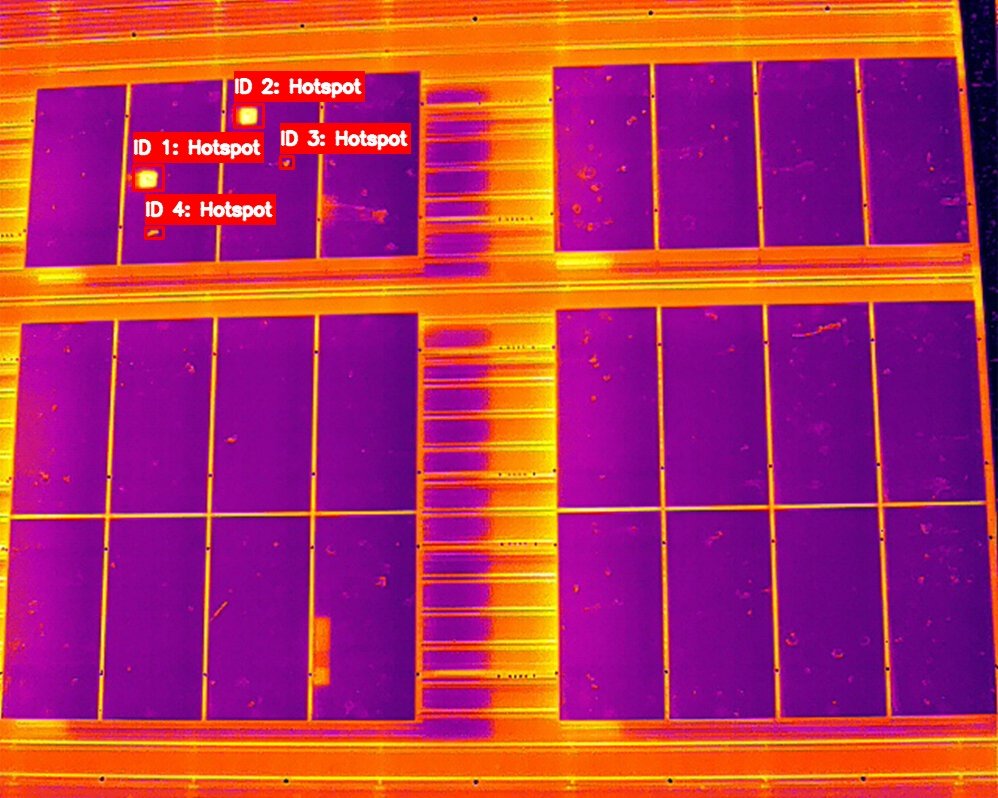
Thermal scan with AI-detected hotspots on a solar panel array
4 hotspots found
Report generated
12 pages · Ready to share
500 MB
Drone maps per upload, up to 500 MB
Athena
Automatically finds faulty panels
INVYRO
Connected inverter monitoring · separate module
From drone photos to a decision
your crew can act on.
Four simple steps from upload to a finished report you can share with your client.
01

Upload

Add your drone map or thermal photos (up to 500 MB). Your files are stored securely and checked in the background, so you can keep working.

02

Detect

Athena looks at every solar panel and flags the ones that run hot or look damaged. Even very large sites are handled reliably.

03

Review

See what Athena found on an interactive map of your site. Accept, fix or reject each finding, and leave notes for the field crew.

04

Report

Approve the findings and issue a report for your client. The evidence it was built from is locked in, and later changes never re-run the analysis. Live monitoring (INVYRO) is a separate add-on.

inspection workspace — illustrative walkthrough
Step 1 · Upload
Upload the survey
Add your drone map or thermal photos, up to 500 MB per file. Large surveys are accepted in one go and checked in the background.
site_north.tif · 412 MB drone map
Queued for analysis · linked to your site
Step 2 · Detect
Run Athena detection
Athena finds every panel on your site and flags the hotspots. Each finding is pinned to the exact panel on the map.
Thermal scan with AI-detected hotspots on a solar panel array
Athena finished · 4,812 panels checked
4 serious hotspots · each with a confidence score
Step 3 · Review
Check what Athena found
See which panels Athena is sure about and which need a second look. Fix outlines, add the type of problem and a note, and keep every finding tied to its panel for the crew.
Panel B7-C14 · hotspot confirmed
Critical · 21 °C hotter than its neighbours · assigned to field
Step 4 · Deliver
Reviewed report, issued once
A reviewer approves the findings and issues the report. The evidence is locked in, and later corrections become a new version instead of a silent edit.
Report v1 issued · evidence frozen
12 pages · reviewed by your team

From a flight to a report
you can trust.

A short tour of the workspace: bring in a survey, read the site plan, see how a defect is found, and pin it to the exact panel on the map.
Product walkthrough · 1 min 47 s · sound on
It doesn’t just look at photos.
It reads every panel.
A simple illustration on sample data: finding each panel, spotting a hot one, then showing an example risk read-out. Athena only makes suggestions for your team to review; the numbers below are examples, not a forecast.
01 · Big sites, no problem

Every detail, at real size

Large drone maps are split into small pieces and scaled to the same real-world size, so a panel looks the same to Athena whether the drone flew at 40 m or 80 m — and even huge sites run smoothly.

02 · Panels

Every panel counted once

Athena finds each panel and the gap between panels, so two neighbouring panels are never mistaken for one.

03 · Defects

Findings pinned to a panel

Every hotspot and problem is attached to the one panel it belongs to, with a confidence score you can accept or correct — not a vague warning over a whole row.

04 · Risk and live power

Risk meets live power data

Panels can show the reasons behind their risk — a prompt for your team to investigate, not a promise that something will fail. Live inverter monitoring is available separately through INVYRO.

Built like an instrument.
Checked like an asset.

Athena sits behind every panel and hotspot you see — drone map in, a clear answer for every panel out. Scroll to explore.
CH.01 — Reads the site

Any land. Any layout.

No two sites are alike — boundaries twist, roads cut gaps, rows follow the terrain. Athena reads your whole drone map, finds every block of panels on its own, and lays out a grid of every panel using measurements from your own survey. Each panel gets a confidence score, and anything uncertain goes to a review list instead of being guessed.

CH.02 — Spots defects

Problems come in every shape. Athena follows them.

Hotspots, cracks and damage rarely line up neatly. Athena marks each one at its true angle, then assigns it to the single panel it belongs to. Counted once. Pinned once. Easy to find on site.

CH.03 — Expert review

Not one opinion. A council.

Every finding is looked at by a group of AI specialists — Solar PV, Oil & Gas, Marine Structures, Asset Integrity — drawing on engineering know-how and your asset's history. Before a conclusion reaches you, a second group challenges it.

CH.04 — Safe updates

No update goes live on trust.

A new version of Athena only goes live after it passes an independent test on data it has never seen, its accuracy is recorded, and a named person approves it. New abilities stay locked until an authorised approver signs them off. The version you use is the version that passed.

See what matters.
Reduce rework.
Built for people who fly drones, manage assets, and need answers — not dashboards.

Simple upload

Drag and drop your drone map or thermal images. No file conversion, no reformatting — everything goes straight in.

Issue detection

Hotspots, cracks, and anomalies are flagged automatically. You focus on decisions, not pixel‑hunting.

Clear reports

Reviewed in-app reports with maps, annotated images, and plain‑language summaries your clients actually understand.

Team collaboration

Share sites with your crew, assign follow‑ups, and keep everyone — from pilot to project manager — on the same page.

Map‑based view

Every issue is pinned to an exact location on the map. No guessing which panel, which row, or which zone.

Trusted & secure

Your inspection data stays private. You choose who sees which site, and every person only sees the sites and reports their role allows.

Your data, handled with care
Every inspection is private, with role- and site-scoped access. Built for teams who work with sensitive site data.
Private by default Controlled access HTTPS in transit
Questions, answered.
How do I get started?
Get in touch through our contact form. Tell us about your sites and imagery and we will come back to you with the next steps.
What image formats can I upload?
A finished drone map (a GeoTIFF file) up to 500 MB. Raw drone photos need to be stitched into one map first; we can help with that separately.
How does Athena detection work?
Athena suggests where each panel is and what looks wrong, and pins each finding to the right panel on the map. They are suggestions: your team accepts, corrects or rejects them before anything reaches an issued report.
Can my clients see the results?
Yes. Client viewers can be scoped to their own sites. They view issued reports online while your team keeps edit and approval control.
Is inverter monitoring included?
No. INVYRO connected monitoring and anomaly alerts is a separate module. Get in touch through our contact form to find out more.
Is my inspection data private?
Private by default. You control who sees each site, and data sits in your workspace storage.

Ready to spend less time
on reports and more time flying?

Tell us about your sites and imagery and we will get back to you.

Contact us